Need to write how I see https://sites.google.com/site/sanskritcode/survey — in most cases there is only one real solution, the other are just theoretical abstractions that will never reach real life realizations. But it’s a good starting point.
Natural Language Processing in general is a thriving field, with open source projects such as openNLP.
Dictionaries and thesauruses
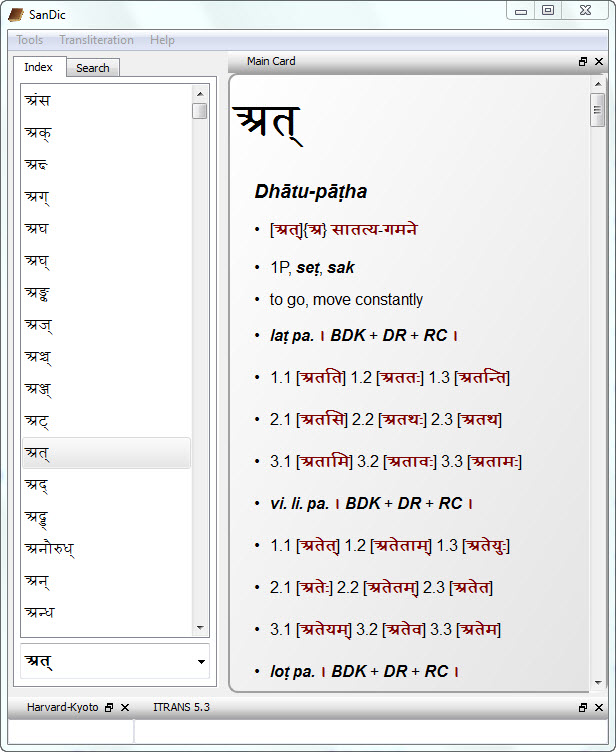
Digitize dictionaries(D, B), comparative dictionaries(T), sUtras and thesarauses(H), enable online search(B, 2B), make them available on phones as convenient apps (S, A). Some online dictionaries enable collaborative editing. They do have the following limitations:
But database updated in this manner is not publicly available.
They don’t currently provide an online API (application programming interface) to build on them easily.
Concordence tools (J), perhaps using word-roots (D).
Develop tools which model and illustrate application of various sandhi(F, H, MH, C, C2), prAtipadika declension(D, I=H1, H2, F, B), dhAtu conjugation (F, I=H, 3B, 5B, H2, Dl, ) kRdanta(I=H1, H2, F) and taddhitAnta (I=H1, H2) rules. These can in-turn be used to analyze inflected words (1F, 2F, I=H, B, Dl), do sandhi analysis (1H, 2H), to produce dictionaries of inflected words (F) and find concordence (G).
Inflected word generation is usually based on the ‘word and paradigm’ model, close to the work such as ruupa chandrikaa which gives the naamaruupaavalii for ‘typical’ words ending in different var.nas in different lingas. This is found to be very useful and accurate in the analysis of classical Sanskrit texts.
Limitation: However, as a generative model the above is not perfect because, not being based firmly on pANini’s rules (which separate saMskR^ita from apabhraMShA), they may generate wrong inflections.
Tools to help understand grammer sUtras (H, B, 3V, T, D, A, Ar).
Domain specific languages tailored for the saMskR^ita grammar are beginning to be seen (V).
Parsing and Translation
Mechanically parsing (H) Sanskrit text, doing part of speech tagging(D). Producing, standardizing Sanskrit corpora (I, Ms..).
Translating Sanskrit into a more familiar language. (F=H, 2H)
Note that we have focused on computer programs above, more general, curated collections of links, texts and corpora are available elsewhere (F, N, 2N, D, S…). Also, other summaries are available (I), and tools to download from those corpora is also available (A).
Desiderata
In some cases above source code for Sanskrit tools are available (the links in bold are said to be — our gratitude!); but much good software is not open-source; and there is quite a bit of duplication of effort. Besides the limitations noted above, what is conspicuously missing from the above are tools directed at meeting important needs of the popular spoken Sanskrit movement, especially as we increasingly interact with information through computers and the internet.
Consuming documents and webpages written in other languages in saMskRRita (There is no google-translate like device at present nor will there be one in the near future).
Sanskrit UI versions of commonly used software don’t exist (Unlike Arabic, Hebrew..).
There are no good Sanskrit browser scripts or extensions to do common things like look up word meanings with a click or a mouse-over.
No effort at generating Sanskrit content easily. Eg: Sanskrit wikipedia is nowhere close to the english version. Same goes for the wiktionary.
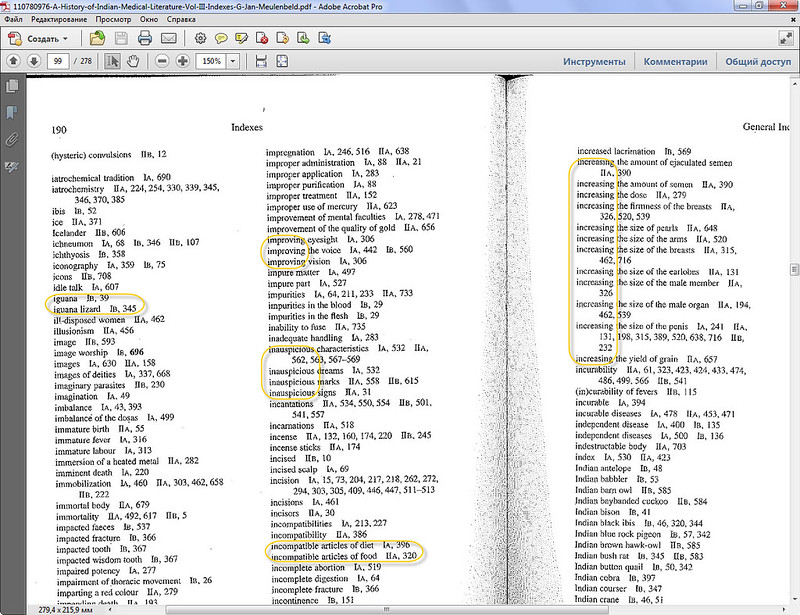
HIML, AMD are two of the latest ayurvedic indexes published. HIML is great. AMD is mediocre. But both have several issues in common. Yes, sorting has gone wrong. And sorting is something rather important for a dictionary or word index. Is it not?
Directions for Use
The harmonization of the indexes requires attention to some points which may facilitate finding the lemma searched for. This is because of variations in spelling between volumes I/II and volume III.
Majuscules and minuscules may not always have been used consistently.
Compound nouns are sometimes written as one word, sometimes as two; the latter may be with or without a hyphen.
Slight variants in spelling (for instance: mythic/mythical) may be disregarded.
Spelling variants are retained when present in the sources.
Further, it is not clear in some instances whether a word is a proper name or a title (see, for example: Bindusāra, Viśva).
It is useful to compare, in the general index, lemmata such as: kinds of.. ./types of… /varieties of…, and: diseases/disorders.
Those acquainted with Sanskrit may compare fever/jvara, etc.
Peculiar features of the index program:
— letters with a diacritic mark precede those without such a mark;
— words with a bracketed part precede those without brackets;
— lemmata consisting of two or more words precede those written as one word;
— compounds with a hyphen come after those without it.
The titles/author featuring in the headings of the volumes 1A and 1B (Caraka-saṃhitā, Suśrutasaṃhitā, Astāñgahrdayasaṃhitā, Astāñgasaṃgraha, Vāgbhata) are not indexed as far as these parts are concerned. For these the reader is referred to the contents.
The sorting in both the books is miserable. There is not sorting logic in AMD and some logic in HIML.
In HIML:
1) Nowhere was it stated that it will be sorted in English alphabet. When opening a Sanskrit book, I expect devanagari ordering. Why should I look for «bh» somewhere inside «b»? And «ś» with «ṣ» are somewhere in the middle of «s»? Fascinating? No. In the age of automatic part of speech tagging for a Sanskrit corpora we can’t even make Sanskrit sorting as it should be. Yes, it was 10 years ago, but for the last 20 years not much has changed for Sanskrit. If we don’t speak about it, nothingwillchange.
2) If it is stated that «letters with a diacritic mark precede those without such a mark», you don’t get the feeling of a mix you actually will get. So it’s not a feature, it’s indexing software failure. Total failure. All diacritics are treated as they are equal to the basic character. To find a word beginning with ā and ū is a miracle (good that there are not many starting with ī).
If I would see the source text, I could get it right. But I guess I never will. And there will be a lot of errors in indexes related to Sanskrit matters.
Old books have correct sorting. New files have none. Why? Because nobody cares.
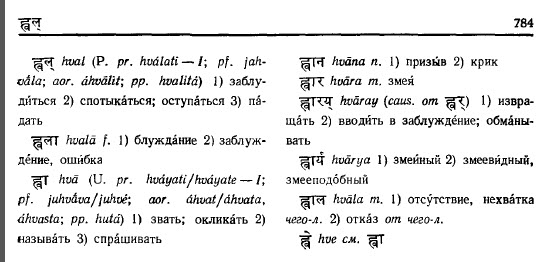
It should be (as in the book)
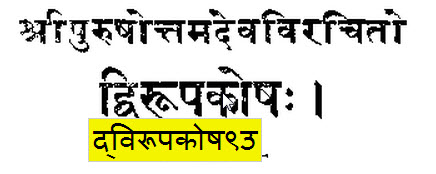
ह्वल्
ह्वला
It’s in Google Docs, MS Word
ह्वला
ह्वल्
Instead. Shorter words are always above but क् and का have the same
number of unicode codepoints. क (one codepoint) is shorter than क्
and का (two codepoints) and they are shorter than क्क (three
codepoints). I was thinking about a preprocessor that will convert
terminal viramas to an auxilliary character and a postprocessor that
will convert this auxilliary character back to the virama. Viramas
play two roles thus we need two distinct characters in the sort table.
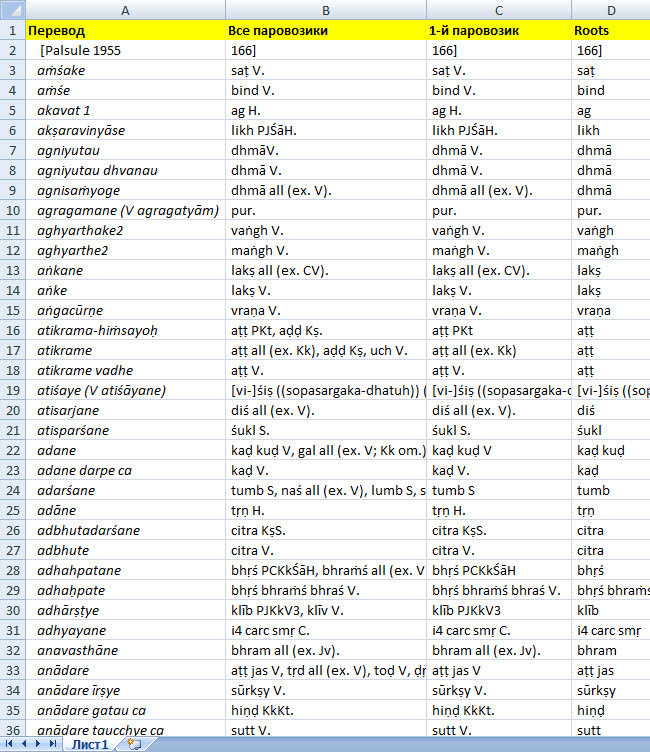
Shorter words should come first, see screenshot.
Excel sorts as:
ह्वरस्
ह्वर्
ह्वला
ह्वल्
ह्वा
ह्वान
ह्वार
ह्वारय्
In the book (and how it should be):
ह्वर्
ह्वरस्
ह्वल्
ह्वला
ह्वा
ह्वान
ह्वार
ह्वारय्
So no, Google Docs are as miserable as MS Office. See .pdf page 24, 25, 27, 29.
Gérard Huet
This is pretty trivial, a simple lexicographic ordering:
(* lexicographic comparison *)
value rec lexico l1 l2 = match l1 with
[ [] -> True
| [ c1 :: r1 ] -> if c1=50 (* hiatus *) then lexico r1 l2
else match l2 with
[ [] -> False
| [ c2 :: r2 ] -> if c2=50 (* hiatus *) then lexico l1 r2
else if c2>50 then c1>50 && c1<c2 (* homonym indexes *)
else if c1>50 then True
else if c2<c1 then False
else if c2=c1 then lexico r1 r2
else True
]
]
;
Every Sanskrit phoneme is represented as an integer between 1 (a) and 49 (h). A word is a list of phonemes. Words are thus sorted by lexicographic ordering over lists of integers.
Homophony indexes are suffix codes, from 50 to 59.
Two pitfalls to avoid for computing on Sanskrit words or sentences:
— Do not compute on syllables, but on phonemes — thus translate devanagarii at the phonemic level
— Do not use strings — specially Unicode strings — use lists
My methodology is very simple. I have designed a toolkit Zen for computational linguistics based on very simple notions, and Sanskrit is just an application of these generic techniques.
The whole Zen toolkit may be downloaded as open source software from a URL given at section Zen on my site entry page. A pdf manual documents the library.
http://icebearsoft.euweb.cz/download/zwxindy.pdf — best documentation on Nāgarī, which is called ‘Varṇamālā’ (वर्णमाला). It is also called ‘kakaharā’ (ककहरा) or ‘Akṣharamālā’ (अक्षरमाला; Akshar-mala)! Varṇa means letter; mālā means chain or garland.
#!/usr/bin/perl
# a string describing the language (to be exact, the sorting order)
$language = «Hindi»;
$prefix = «hi»;
$script = «devanagari»;
# Technically speaking, $alphabet is (a reference to) an array of arrays of
# arrays. Sounds complicated? Don’t worry! Explanation follows:
# Every line describes one letter of the alphabet (in all its variants).
# The first string is the name of the letter; this appears in the heading of
# letter groups (when defined with the proper markup). Currently the maximum
# number of letters is limited to 95. A future expansion up to 223 letters
# should be no problem.
# Next follows a sequence of arrays, delimited by commas. Each of these arrays
# describes one variant of the letter with different diacritical marks
# (accents). The order of those describes the sorting order if two words
# appear which differ only in the diacritical variant of this letter.
# Currently the maximum supported number of diacritical variants of one letter
# is 93.
# Each of these arrays contains first the lowercase variant of the letter,
# followed by uppercase variant(s). You might wonder: How can there be other
# than one uppercase variant? Consider the letter combination `ch’: Uppercase
# variants here are: `Ch’ and `CH’. Also, in some character sets there might
# not exist an uppercase variant of a letter, e.g. the letter `’ in the
# ISO-8859-1 character set. In this case we just leave it out.
# The sum of the number of uppercase and lowercase variants of one diacritical
# version of a letter should be 10 or less. (In case of `ch’ it is 3:
# `ch’, `Ch’ and `CH’)
# There can be empty arrays [] which are called slots. They are used for
# mixing alphabets of different languages.
# The next should be pretty easy:
# It means: » is a ligature which is sorted like the letter sequence `ss’
# but in case two words differs only there, the word with » comes after the
# one with ‘ss’ (e.g. Masse, Mae.)
# The same with /, only this time with uppercase/lowercase variants.
# The order of the lines in $ligatures does not matter.
# `special’ are those characters which are normally ignored in the sorting
# process, but e.g. to sort the words «coop» and «co-op» we must also define
# an order here.
Oliver’s OCR tool is the best option for recognizing a Sanskrit text. It was so before 2010. It is even more so in 2013. I have heard Indian’s coders speaking (on Sanskrit conferences) long talks about how hard it is to make, and only this German guy made it possible. There are no real alternatives. Don’t even waste your time. Years ago Oliver’s software had a recognition rate 20-30% lower. It was free of charge at that time. It can be still downloaded (but no long from the official website). Starting from 2010 the updated version is sold and it’s accuracy rate is around 95%. Which is fantastic.
Indian books are printed on bad paper. There are enough ligatures than can make even a font designer go mad.
Lots of ligatures
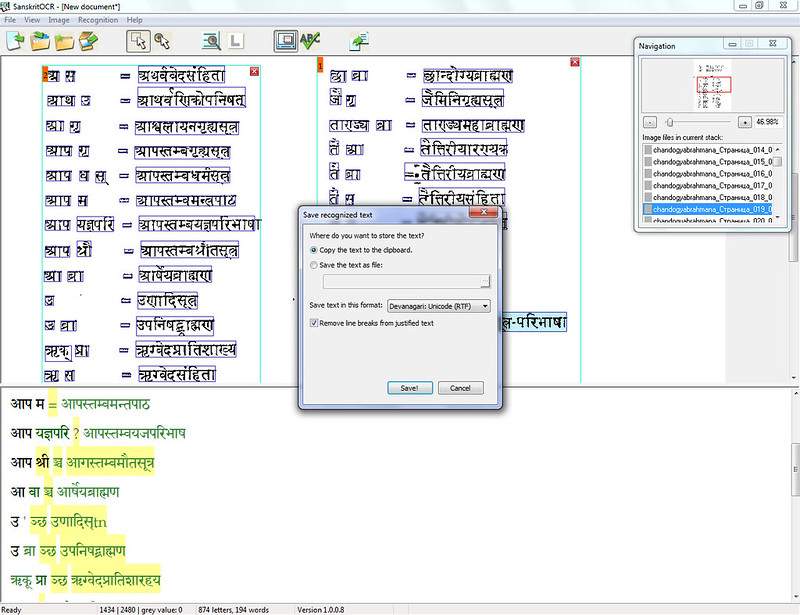
I have been working with Sanskrit OCRing for 11 years now. Until today — mostly romanized IAST. Indian quality printed IAST, good IAST — all kinds of them. I know how to make things run, train templates. Oliver’s Sanskrit OCR is where ABBYY FineReader was before v.7. It does the simple things and does them badly. It splits more frames than it should (instead of 2 columns it makes 7, but there never have been 7 column Sanskrit books). All OCR software has the same problems. Most of them get never solved. Not because they can not be. Because the wrong algorithm is used.
ABBYY
Major issues:
1) No batch recognize pages. I recognize one page at once. It takes a few days to recognize a 200 page book, just pressing same shortcut on every page. That’s insane. Never seen it even in the earliest versions of ABBYY Fine Reader.
Where is it? Batch export, I mean. And is there Batch analysis of the same layout for let’s say 1000 pages at once? Now I recognize each page at once. It takes around a minute for a page. So I have to keep the window open all the time and do monkey stuff.
Too many, instead of two columns
2) No batch export recognized text. Maybe the batch export function is in HindiOCR (professional) for 199 Euros, but it is not there for SanskritOCR. So no batch option makes it very hard to use.
[Professional version only:] To store the text of all recognized pages in one file, use the option «All pages» in the list Batch export. Activate the option Store in separate pages if every recognized page should be stored in a separate file on disk.
No batch export
Smaller OCR Issues:
1) It looses dots in references all the time. It «clears» them as junk data, but when 2-4 Indian numbers come in a line, there is a good chance that after the 1st or 2nd a dot will come. And in most cases it is clear enough, but still gets killed.
Upper script numbers are not recognized as such.
OCR working screen
2) There is no Save project option. Only when you close the tool it asks if you want to save. So you can loose all your work in a minute. Project is not as in ABBYY all the images and the OCR layer in one folder. It’s not even the OCR. It’s the master file, that I don’t know how is even connected. If I move the images to another disk, should I redo the OCR one page at a time?
3) When «Text recognition» mode starts the main windows closes and only a small one is visible. Does it has to be? When recognition ends, it opens again the main window.
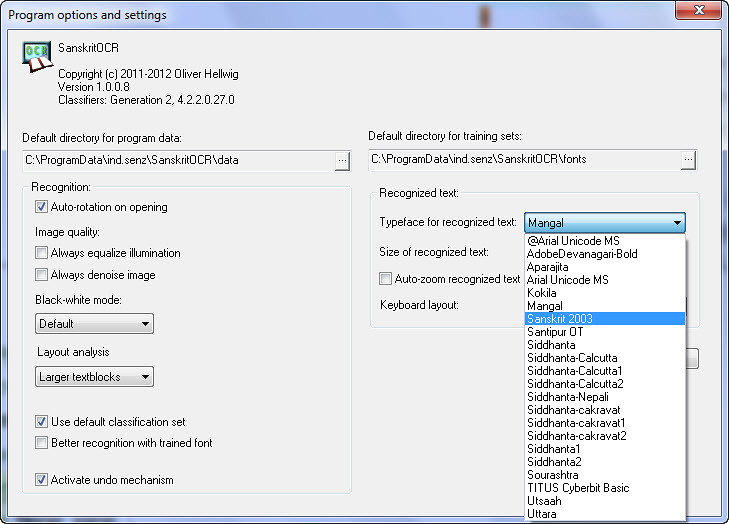
4) Options are rather too simplistic. And having Mangal instead of Sanskrit 2003 at least for Sanskrit ligatures is a bit… strange. Default font size 14 is rather small, 16 or 18 should be preferred.
Fonts to choose from Fonts folder
5) The zoom for pages is not remembered. If I zoom 200%, when I click on next page it’s back to 10%. So there are next to no preferences. If I zoom in, the recognize Shorcut does not works anymore. So I have to go to the menu for every page. Too many clicks for a simple thing as this. And yes — the shortcut can’t be made with a single hand. Why not attach it to a single letter, like F5? Why on earth should I press 3 buttons?
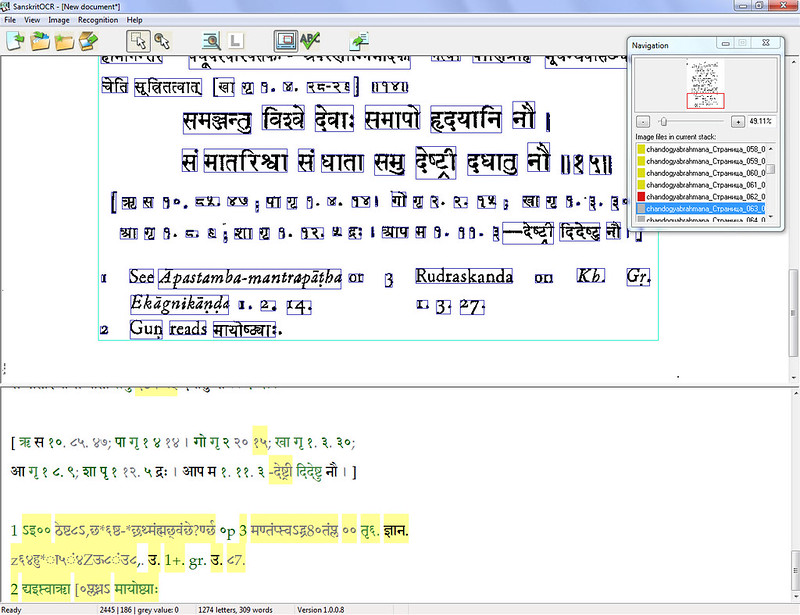
6) Let’s ignore Latin text. In scientific literature (and we worry about Sanskrit books, not Sanskrit newspapers) there happen to be footnotes. Many of which are in Latin letters. It would be a huge progress if after encountering a lot of «bad» Devanagari it would stop making nonsense OCR at all. If it manages 800 ligatures, it can manage 30 Latin letters, right? At least to kill ’em.
No OCR of non-Devanagari
7) Initial importing of images can take a few hours. It does not matters much, but for a 1020 page dictionary one must be patient. Speed is not too high and I don’t mean the recognition, it’s just the loading of .jpgs. Importing .pdf option would be nice as well. Because exporting .jpg from a .pdf means pixels lost and worse OCR results.
8) The icons, UI is like built in 1999. If Oliver would agree I could draw for free icons same style as http://www.fatcow.com/free-icons just to make it look like it’s not ’99.
9) If you don’t mark a text block before starting recognition, the program automatically uses layout analysis to detect the text blocks.
Should it mean, if I draw the layout and don’t touch anything it will be applied to all pages?
It is the best tool out there. The others are much worse, I’ve scanned thousand of books. I’ve OCRed hundred of them. Believe me. But without batch features it does not makes much sense even for the best Sanskrit OCR tool.
On DSC website we see, that it’s possible to add a «dirty» OCR layer of devanagari to book scans. To see it not online, but offline and in .pdf books would be a revolution. But we are not yet ready for it. And there is not a strong enough demand. Searching devanagari in .pdf is still a pain, even with a «clean» Unicode text.
Наш сайт использует файлы cookie. Продолжая им пользоваться, вы соглашаетесь на обработку персональных данных в соответствии с политикой конфиденциальности.
Cookie Preferences
Manage your cookie preferences below:
Essential cookies enable basic functions and are necessary for the proper function of the website.
Name
Description
Duration
Cookie Preferences
This cookie is used to store the user's cookie consent preferences.